
Njunwa Wamavoko
JF-Expert Member
- Aug 11, 2012
- 5,757
- 2,388
Baada ya kupokea Simu na PM nyingi watu wakiomba Settings za Mitandao mingine kam niliyoitaja hapo chini nimeona nishare nanyi jinsi ya kupata hizo settings ambazo zitakufaa kulingana Mtandao unaopata 3G/4G eneo lako
Ni mda pia muafaka wa watumiaji wa VPN kujisifu maana mpaka sasa almost ISP wote hapa chini kwetu wameanza kutoa magic SIM Cards hivo kutupa nafasi kubwa kufurahia speed tamu sana na kuchagua ISP umtakaye bila shida
MAGIC SIM CARD Providers:-
1.Basi la Kabang
2.Tabsamu
3.Basi la kijani GSM and CDMA(weak)
Hivo katika Tutorial ya leo ntaelekeza jinsi ya kupata Free Open Ports itwasaidi hakina @X.100 na kichwanazi waliowahi kuomba msaada wa vitu kama kutumia loopholes kwa baadhi ya ISP tajwa hapo juu
There are Two types of ports
1.UDP ports e.g 80,8080,9201,9200,443 and are usually faster than TCP ports
2.TCP ports e.g 443 is usually open in every ISP but requires a Free working page e.g http://internet.tigo.co.tz and Proxy
Katika tutorial ya leo ntadeal na UDP ports kwa leo siku nyingine ntaongeza TCP port scanning
Methods and Tools Used in Port scanning
1.PD proxy port scanner
2.Tunnelguru Port scanner
3.Wi-Free a magic VPN
4.Packet analyser e.g wireshark and smart sniifer from HERE
How to Scan for free Open ports
1.Using PD Proxy
>Register free Account if not yet from HERE
>Download default PD Proxy from HERE
>Connect your USB Dongle with default APN and 0 balance
>Run PD Proxy and feel your login details

>Navigate to settings>advanced settings>proto options then fill ports to 0

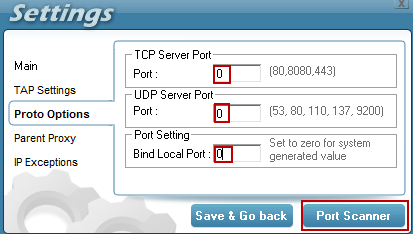
>Save and Go back and press connect it will say scanning open ports>Open ports xxxx found and it will connect


>Use the Port sniffer to record the Remote port(Rport) and Local port(Lport) download it from HERE

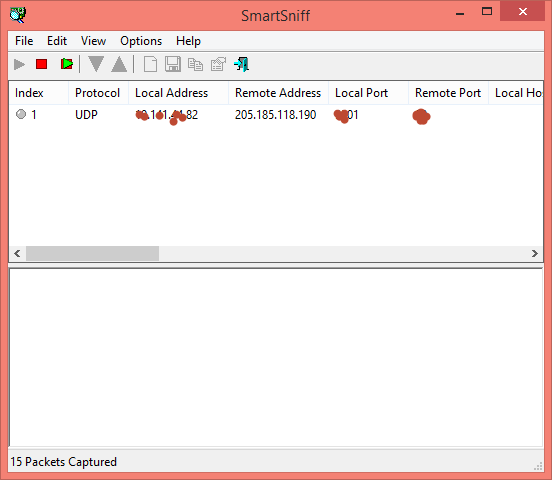
N:B Do not USE the Port scanner for it takes a Century to finish
2.USING TunnelGURU version 2.4
>Install Java from HERE
>Run TG 2.4 and follow the instructions from Port scanner

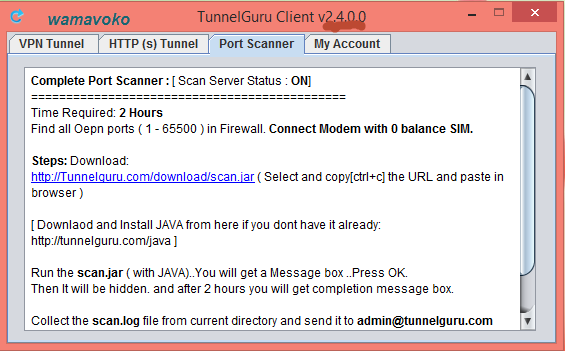
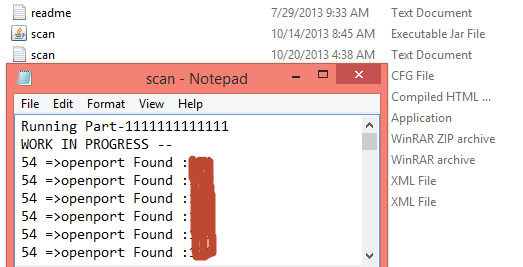
Results will be after 2hours

3.Using Wi-Free
>Download it from HERE
>Register HERE
>Run Wi-Free as Admin and alternatively properties>compatibility
>Connect your USB Dongle as usual aand Connect Wi-Free
>When it is connected Use Port sniffer to record the Rport and Lport

NOTE:Make sure you note the IP of the server you are using to connect to know the really Open port you are connected to
Ni mda pia muafaka wa watumiaji wa VPN kujisifu maana mpaka sasa almost ISP wote hapa chini kwetu wameanza kutoa magic SIM Cards hivo kutupa nafasi kubwa kufurahia speed tamu sana na kuchagua ISP umtakaye bila shida
MAGIC SIM CARD Providers:-
1.Basi la Kabang
2.Tabsamu
3.Basi la kijani GSM and CDMA(weak)
Hivo katika Tutorial ya leo ntaelekeza jinsi ya kupata Free Open Ports itwasaidi hakina @X.100 na kichwanazi waliowahi kuomba msaada wa vitu kama kutumia loopholes kwa baadhi ya ISP tajwa hapo juu
There are Two types of ports
1.UDP ports e.g 80,8080,9201,9200,443 and are usually faster than TCP ports
2.TCP ports e.g 443 is usually open in every ISP but requires a Free working page e.g http://internet.tigo.co.tz and Proxy
Katika tutorial ya leo ntadeal na UDP ports kwa leo siku nyingine ntaongeza TCP port scanning
Methods and Tools Used in Port scanning
1.PD proxy port scanner
2.Tunnelguru Port scanner
3.Wi-Free a magic VPN
4.Packet analyser e.g wireshark and smart sniifer from HERE
How to Scan for free Open ports
1.Using PD Proxy
>Register free Account if not yet from HERE
>Download default PD Proxy from HERE
>Connect your USB Dongle with default APN and 0 balance
>Run PD Proxy and feel your login details
>Navigate to settings>advanced settings>proto options then fill ports to 0
>Save and Go back and press connect it will say scanning open ports>Open ports xxxx found and it will connect
>Use the Port sniffer to record the Remote port(Rport) and Local port(Lport) download it from HERE
N:B Do not USE the Port scanner for it takes a Century to finish
2.USING TunnelGURU version 2.4
>Install Java from HERE
>Run TG 2.4 and follow the instructions from Port scanner
Results will be after 2hours
3.Using Wi-Free
>Download it from HERE
>Register HERE
>Run Wi-Free as Admin and alternatively properties>compatibility
>Connect your USB Dongle as usual aand Connect Wi-Free
>When it is connected Use Port sniffer to record the Rport and Lport
NOTE:Make sure you note the IP of the server you are using to connect to know the really Open port you are connected to
THIS TUTORIAL MAY SEEM MEANINGLESS BUT IT WILL BE USEFUL ON THE APPOINTED TIME
MOTTO:SHARING IS CARING
MOTTO:SHARING IS CARING


