
KAJICHO KIVULI
JF-Expert Member
- Jul 30, 2013
- 2,061
- 547
Windows 8 operating system is such a beautiful operating system of all time, I like its metro UI but as everybody knows that Windows 8 still don't have a start menu in it which I personally miss a lot, While searching for the start menu for my own Windows 8, I came across many start menu software like Start 8 but here I will only review 3 freeware software those can bring back your start menu in Windows 8.
List of 3 free, quick & easy Start menu applications for Windows 8, which helps you bringing back missing Start button in Windows 8 for you.
[h=4]1. StartW8:[/h]
StartW8 is a FREE and powerful tool to get back your old Windows 7 style of start menu in Windows 8. You can customize your apps, folders and links which you want to display at start menu. This app will add start menu with search box at bottom. While testing many I liked this one most because it is lite and doesn't consume a lot of memory which is good for any Windows PC.

StartW8 allows users to access their apps and folders with greater ease as it adds a fully-functional Start Menu to their Windows 8 computer/notebook. Users can also easily search a specific file or program in the search box, or they can simply shut down their PC, reboot or switch users too.
StartW8 Features:
Start Menu 8 is one of the best Start menu replacement from IObit which is specially designed for Windows 8. This free tool comes with both the Windows 8 start button and Windows 8 Start Menu and offers the option to skip Metro start page, allowing users who only work on desktop to boot to Windows 8 desktop directly. You can very easily switch between Metro and desktop Interface,

Start Menu 8 brings back your classic Windows 7 style start menu, When you click on Start button, you'll get a list of folder shortcuts on the right, a list of program folders for easy access to all your applications, and a search bar on the bottom. Start Menu 8 looks, behaves like the old Start button but with some features in it.
Start Menu 8 Features:
[h=4]3. Spesoft Windows 8 Start Menu:[/h]
Spesoft Windows 8 Start Menu free app also allows you to get Windows 7 style Start menu in Windows 8 users. It is one of the simple and light weight app. It will work simple way, first download and install it from the link above, and right click on the app then Pin to Taskbar. And, whenever you need a start menu, only click on its icon at the Taskbar which you've pinned before, and your Start Menu will appear, now you can access anything you like.

Its also has search box bottom of the start menu where you can search any installed apps. And rest of the features just like Windows 7 start menu like like Documents, Music, Pictures, Computer and Control Panel, etc.
Spesoft Windows 8 Start Menu Features:
Start menu is been most important part of our navigation of Microsoft Windows for a long time and used by billions of users all around the world and increasing month by month. But Windows 8 launched without it and that is why you are here to get it back your Start menu.List of 3 free, quick & easy Start menu applications for Windows 8, which helps you bringing back missing Start button in Windows 8 for you.
[h=4]1. StartW8:[/h]
StartW8 is a FREE and powerful tool to get back your old Windows 7 style of start menu in Windows 8. You can customize your apps, folders and links which you want to display at start menu. This app will add start menu with search box at bottom. While testing many I liked this one most because it is lite and doesn't consume a lot of memory which is good for any Windows PC.

StartW8 allows users to access their apps and folders with greater ease as it adds a fully-functional Start Menu to their Windows 8 computer/notebook. Users can also easily search a specific file or program in the search box, or they can simply shut down their PC, reboot or switch users too.
StartW8 Features:
- Automatically switch to desktop immediately after signing in.
- Start menu in Windows 8 as well as Windows 8.1 design, but Windows 7 functionality.
- Buttons: Log off, lock and turn off.
- Traditional search box bottom of the menu.
- Favourite applications.
- All user configurable.
- Multilanguage support (28 languages)
Start Menu 8 is one of the best Start menu replacement from IObit which is specially designed for Windows 8. This free tool comes with both the Windows 8 start button and Windows 8 Start Menu and offers the option to skip Metro start page, allowing users who only work on desktop to boot to Windows 8 desktop directly. You can very easily switch between Metro and desktop Interface,

Start Menu 8 brings back your classic Windows 7 style start menu, When you click on Start button, you'll get a list of folder shortcuts on the right, a list of program folders for easy access to all your applications, and a search bar on the bottom. Start Menu 8 looks, behaves like the old Start button but with some features in it.
Start Menu 8 Features:
- Customizable, Easy, and FREE to Use.
- Easily Switch between Metro and Desktop Interface.
- Faster Access to Programs and Files
- Function for Disabling Bottom-left/Top-left Hot Corners.
[h=4]3. Spesoft Windows 8 Start Menu:[/h]
Spesoft Windows 8 Start Menu free app also allows you to get Windows 7 style Start menu in Windows 8 users. It is one of the simple and light weight app. It will work simple way, first download and install it from the link above, and right click on the app then Pin to Taskbar. And, whenever you need a start menu, only click on its icon at the Taskbar which you've pinned before, and your Start Menu will appear, now you can access anything you like.
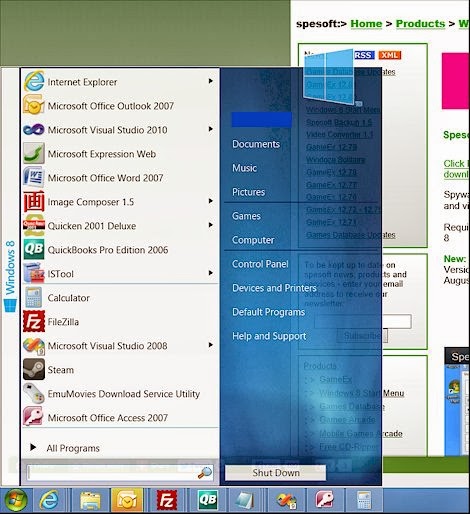
Its also has search box bottom of the start menu where you can search any installed apps. And rest of the features just like Windows 7 start menu like like Documents, Music, Pictures, Computer and Control Panel, etc.
Spesoft Windows 8 Start Menu Features:
- Simple, free and light weight app.
- Good Windows 8 start menu app.
- Buttons in the menu: Shutdown, log off, and switch users, etc.
- Use this app by Pin it to Taskbar.


