Recover the Permanently deleted files from your PC

Recover the Permanently deleted files from your PC

Herbalist Dr MziziMkavu

JF-Expert Member
Joined
Feb 3, 2009
Posts
43,037
Reaction score
34,741

Yes, you can recover your permanently deleted files. They can also be recovered if you delete them from Recycle Bin.
I always wonder how a file can be recovered after its removal from Recycle bin. Where that file actually get stored after deletion.?? Well here is the answer.

When a file is deleted from your computer, Windows simply marks the hard drive space as being available for use by changing one character in the file table so that the file entry won't be displayed in My Computer. If you manage to start an undelete process before the Windows uses that part of the hard drive to write a new file, all you have to do is set that flag back to "on" and you will get the file.

So, it means there is no guarantee that your file can be recovered but if you're Lucky then can get it back.


Here I'm going to use EASEUS Data Recovery Software. Download it from here.
Remember, don't install this software in the drive from which you need to recover the data. It might can overwrite to disk space which results into permanent data loss.


  • Install and Run the Software. Click > Complete Recovery.


  • Now select the type of your file like video, image etc. click > next
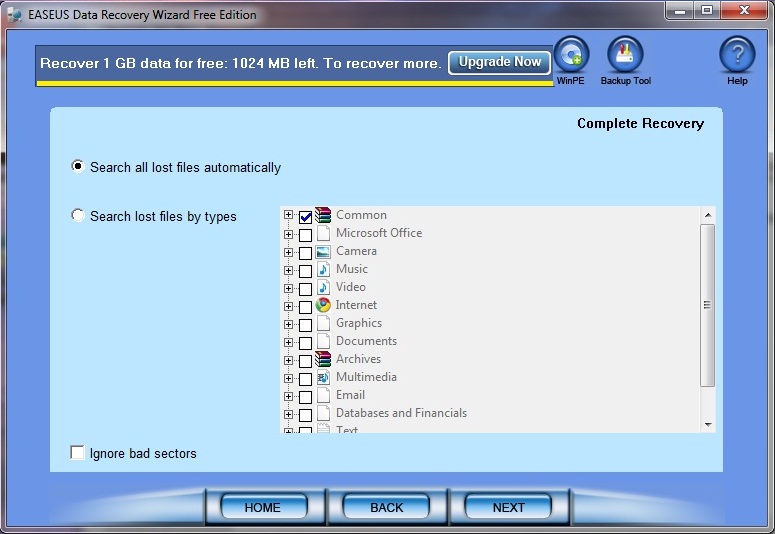


  • Select the drive in which your file was previously stored. click next


  • then the software will start scanning your drive.


  • After the scanning you can see the list of deleted files. Now select and recover your files.


Hi guys. In this simple tutorial I'm gonna show you how to retrieve the deleted files without any additional software. This trick is for windows 7 or later versions so sorry for Linux and XP users as of now..
Here, I'm sharing a simple example to demonstrate the method. You can use it later independent of file and folder names.
Follow these simple steps..

1) Create a Folder say Office backup (any name)
2) Put any file in it say test.pdf (it could be any file(s) )
3) Now open the folder and simply delete the file
4) Right Click on folder > in the menu click on Restore previous versions
step+1.jpg


5) Simply click Restore and apply the changes
step+2.jpg


6) if you didn't find Restore previous versions option then navigate to Control Panel > System and Security >

System
>System Protection (left pane) > select your drive > click configure > select Restore system settings

and previous version of files
.

Note: be careful with this method as its irreversible.

 
If your files are not found in the Recycle Bin, don't save or delete anything from your computer. Your chances of recovering the file are much higher if you don't save anything new in the system. This is because when a file is deleted, it is actually just set to be overwritten. If no new data has overwritten the original file, then it can usually be recovered. More about.....
How to Restore Deleted Files from Windows Computer
 
Back
Top Bottom