josephjul40
JF-Expert Member
- Jan 16, 2012
- 218
- 40
Imekubali yaani ni noma


Thnks but ina andikaa it need more than 2.0Use your USB drive as RAM
hey guys. It often happen with us that whenever we try to Install any utility or try to play any game then it requires a large RAM than the currently installed in our system.
I'm sharing a simple trick by which you can treat your USB drive as Random Access Memory and can fulfill such requirements.
This Hack is also helpful in case you're running any Virtual Operating System. By increasing your RAM you can boost up all the present applications.
This trick actually varies with the Operating System. Here, I'm sharing both of the Tricks
For Windows 7/Vista:
- Insert your USB drive.
- Backup all its data and Format it usingFAT32(default) file system
- Right click on it > select properties
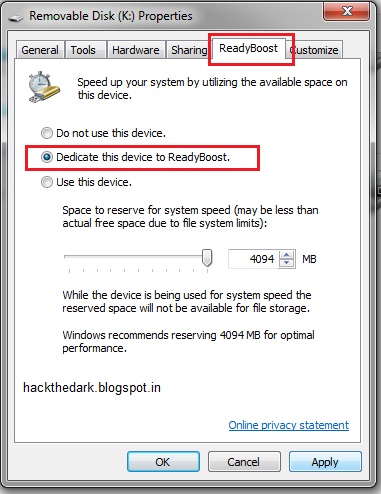
- click on ReadyBoost tab
- here click on Dedicate this device to ReadyBoost
- Adjust the size to be used according to your need.
For windows XP:
- Click Apply. That's it enjoy the hack now.
Alternatively for Windows XP, you can also use a small software here calledebooster. Get it from here
- Insert your USB drive.
- Backup all its data and Format it using FAT32(default) file system
- Right Click on My Computer.
- Click on Advanced tab then in the Performance section click onSettings.
- In the new Box go to Advanced Tab.
- In the Virtual memory section click on Change
- Select your USB drive here, assuming its J:
- Set the size according to your requirement.
- Click Ok. Restart your PC to take effects.


Mkuu inaa maan hyo flash unakua unaichomeka kila utakapo tumia pc yako au ukushaseti ndo basiUse your USB drive as RAM
hey guys. It often happen with us that whenever we try to Install any utility or try to play any game then it requires a large RAM than the currently installed in our system.
I'm sharing a simple trick by which you can treat your USB drive as Random Access Memory and can fulfill such requirements.
This trick actually varies with the Operating System. Here, I'm sharing both of the Tricks
For Windows 7/Vista:
- Insert your USB drive.
- Backup all its data and Format it usingFAT32(default) file system
- Right click on it > select properties
- click on ReadyBoost tab
- here click on Dedicate this device to ReadyBoost
- Adjust the size to be used according to your need.
For windows XP:
- Click Apply. That's it enjoy the hack now.
Alternatively for Windows XP, you can also use a small software here calledebooster. Get it from here
- Insert your USB drive.
- Backup all its data and Format it using FAT32(default) file system
- Right Click on My Computer.
- Click on Advanced tab then in the Performance section click onSettings.
- In the new Box go to Advanced Tab.
- In the Virtual memory section click on Change
- Select your USB drive here, assuming its J:
- Set the size according to your requirement.
- Click Ok. Restart your PC to take effects.