HDD partition.

HDD partition.

khashdz

Member
Joined
Jul 14, 2011
Posts
54
Reaction score
25
Hi,
Wandugu nataka kufanya partition ya external HDD, so naitaji software nitakayoweza kufanya hiyo kazi ktk Win8.
kama kuna mutu ana link itakoyoniwezesha kudwnload....,plz help....
 
SINA LINK ILA JARIBU HIZI WIZARD ZINAWEZA KUKUSAIDIA
CLICK hapo kwenye search na type maneno disk management
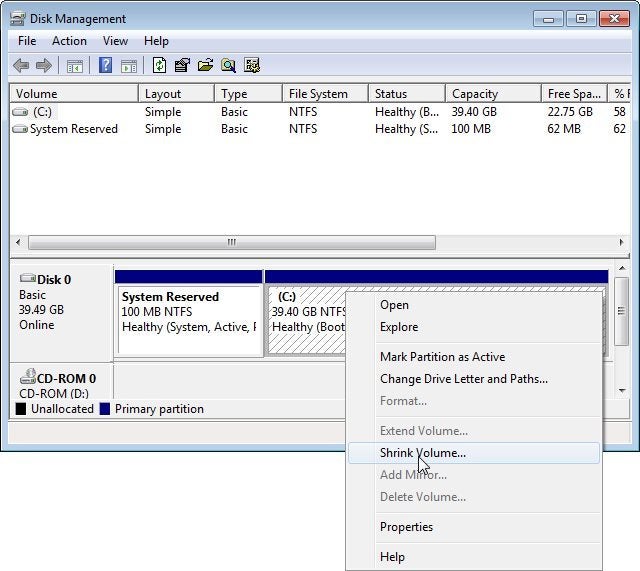
then utapata maneno haya "create aand format hard disc partition then utaangalia kama kuna unallocated space ukiipata right click then uta select NEW SIMPLE VOLUME kama hakuna unallocated space Shrinks volume yenye memory kubwa the an amount shrinked itakuwa unallocated space then utafuata maelekezo ya hyo wizard kutengeneza partition or new volume


USINGIZI HUU LOO NAANDIKA NIKIWA NIMELALA
 
Hi,
Wandugu nataka kufanya partition ya external HDD, so naitaji software nitakayoweza kufanya hiyo kazi ktk Win8.
kama kuna mutu ana link itakoyoniwezesha kudwnload....,plz help....

tumia MINI TOOL PARTITION WIZARD. ni free search google
 
Unaweza kufanya bila kutumia 3rd party software. Nenda kwenye disk management ya windows 8 utaona hiyo option
 
Hi,
Wandugu nataka kufanya partition ya external HDD, so naitaji software nitakayoweza kufanya hiyo kazi ktk Win8.
kama kuna mutu ana link itakoyoniwezesha kudwnload....,plz help....
How to partition a hard drive


But first, you need to take some precautions. If you don't already have one, make a fullimage backup of the entire drive. Disasters happen.
Next, make sure you have enough free room on the existing partition to create the new one. You may find the following articles useful in clearing up space:


If you still don't have enough room, you can move files to an external drive. Once the partitioning is done, you can move them back to the new partition.

Now you're ready to do the actual parititoning. Windows 7 and 8 both come with a reasonably useful partitioning tool. It will probably serve your needs, and if it doesn't, you'll know soon enough.

In Windows 7, click Start, or inWindows 8, go to the Search charm. Either way, typepartitions (and yes, you need the s), then select Create and format hard disk partitions.
The Disk Management program will come up. To shrink the existing partition, right-click it and select Shrink Volume.


Then wait. It may take a while Eventually, a dialog box will ask how much you want the partition shrunk. The default number will be the maximum available.

And therein lies Disk Management's problem. If the current partition has 228GB free drive, you should be able to shrink it by anything less than 228GB. But Disk Management may not let you shrink it anywhere near that much. If the program won't allow you to shrink the partition as much as you want, skip to the last paragraph.
1212-less-space-than-available-100136656-orig.jpg


Your drive may have 23GB of free space, but Disk Management may only let you have 12GB of that.Let's assume that Disk Management allows you to shrink the partition sufficiently. In that case, set the right size, click the Shrink button, and follow the prompts. When the resizing is done, right-click the physical drive's unallocated space and select Simple New Volume.
1212-new-partition-100136487-orig.jpg

Then follow the wizard.
1212-easeus-partition-100136557-orig.jpg


Click for full imageBut if Disk Management can't shrink the partition as far as you want it to, it's time to go with a third-party program. I recommendEASEUS Partition Master Free. It's simple and, as the name implies, free. And it can shrink your partition until there's almost no empty room. But when you install it, select the Custom Install option to avoid installing extra, unwanted programs.

 
Back
Top Bottom