
KAJICHO KIVULI
JF-Expert Member
- Jul 30, 2013
- 2,061
- 546
WELCOME IN

If you are dual-monitor user, now you can personalize with different wallpaper to the each display in a dual monitor setup. In Windows 8 you can't add custom or third-party themes by default without modifying or patching three windows system files: themeui.dll, Uxlnit.dll and uxtheme.dll. Don't worry now you can easily patch these files with UltraUxThemePatcher. Just download this application and then follow some simple steps to install it. All three files will be automatically replaced during the installation, you only will have to restart your computer for the changes to take effect.
After patching files, you can download and install any themes and skins listed below and copy the theme files and folder to: C:\Windows\Resources\Themes
Free Skin Packs for Windows 8:
1. 8Style Skin Pack for Windows 8:
Skin Pack completely change the visual style of your desktop, with the skin packs you can change the looks of the windows 8 Icons, Visual Style. This Skin Pack allows you to transform Windows 8 into new modern 8style.
Download: 32 Bit | 64 Bit
2. Metro Skin Pack 4.0 for Windows 8:
It also supports Windows 8 32 & 64 Bit of any language / any edition. It also changes all the icons, wallpaper, and even the theme in Windows 8. Its Visual style has dark color.
Download: x86 | x64
Free Third Party Themes & Visual Styles:
If you want to give your desktop a complete makeover, then you need a full skin or visual style, which replaces system files to provide you with deep customization instead of only changing the wallpaper.
3. TwentyThirteen
4. Space Blueberries
5. Night Smooth
6. Incomplete VS
7. Gray 8
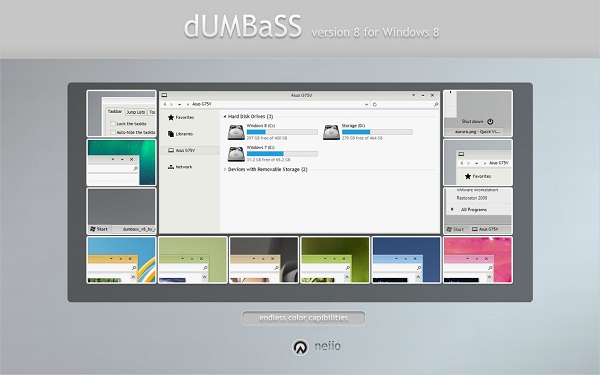
8. Dumbass V8
9. Dark 8
10 Work for Windows 8
11. Alduin
12. Platinum
13. Area04.8
14. Simplex
15. Ourea
16. Aero By Design
Microsoft Windows Themes:
If you don't like customizing every UI element and only want a pack of nice looking wallpapers, you might be interested in the themes from the official Windows website. Below you can select your own style from the collection.
17. Spectacular Skies
18. Limited Edition Artist Series
19. Space
20. Illusions
21. Bubbles
22. Surreal Territory
23. Cobblestones and Corridors
Themes For Dual Monitor Setups (Panoramic):
These panoramic themes are quite different from the regular themes, they displayed differently on your screen. In a dual monitor setup, instead of displaying the same wallpaper on both desktops or a different on each screen, a panoramic wallpaper extends across both monitors but if should have the same resolution.
24. Bridges Panoramic
25. Cityscapes Panoramic
26. Forests Panoramic
enjoy++

If you are dual-monitor user, now you can personalize with different wallpaper to the each display in a dual monitor setup. In Windows 8 you can't add custom or third-party themes by default without modifying or patching three windows system files: themeui.dll, Uxlnit.dll and uxtheme.dll. Don't worry now you can easily patch these files with UltraUxThemePatcher. Just download this application and then follow some simple steps to install it. All three files will be automatically replaced during the installation, you only will have to restart your computer for the changes to take effect.

After patching files, you can download and install any themes and skins listed below and copy the theme files and folder to: C:\Windows\Resources\Themes

Free Skin Packs for Windows 8:
1. 8Style Skin Pack for Windows 8:

Skin Pack completely change the visual style of your desktop, with the skin packs you can change the looks of the windows 8 Icons, Visual Style. This Skin Pack allows you to transform Windows 8 into new modern 8style.
Download: 32 Bit | 64 Bit
2. Metro Skin Pack 4.0 for Windows 8:
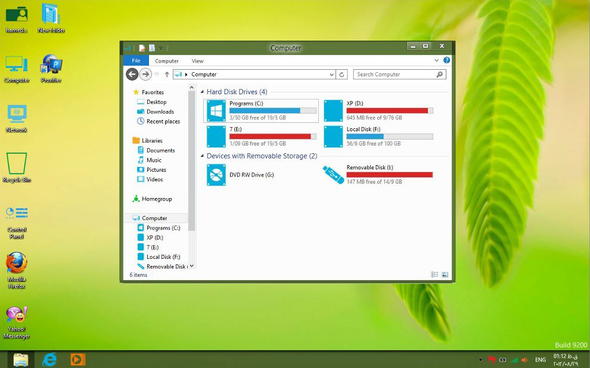
It also supports Windows 8 32 & 64 Bit of any language / any edition. It also changes all the icons, wallpaper, and even the theme in Windows 8. Its Visual style has dark color.
Download: x86 | x64
Free Third Party Themes & Visual Styles:
If you want to give your desktop a complete makeover, then you need a full skin or visual style, which replaces system files to provide you with deep customization instead of only changing the wallpaper.
3. TwentyThirteen

4. Space Blueberries

5. Night Smooth

6. Incomplete VS

7. Gray 8

8. Dumbass V8
9. Dark 8

10 Work for Windows 8

11. Alduin

12. Platinum

13. Area04.8

14. Simplex

15. Ourea

16. Aero By Design

Microsoft Windows Themes:
If you don't like customizing every UI element and only want a pack of nice looking wallpapers, you might be interested in the themes from the official Windows website. Below you can select your own style from the collection.
17. Spectacular Skies

18. Limited Edition Artist Series

19. Space

20. Illusions

21. Bubbles

22. Surreal Territory

23. Cobblestones and Corridors

Themes For Dual Monitor Setups (Panoramic):
These panoramic themes are quite different from the regular themes, they displayed differently on your screen. In a dual monitor setup, instead of displaying the same wallpaper on both desktops or a different on each screen, a panoramic wallpaper extends across both monitors but if should have the same resolution.
24. Bridges Panoramic

25. Cityscapes Panoramic


enjoy++


