
Herbalist Dr MziziMkavu
Platinum Member
- Feb 3, 2009
- 43,113
- 34,953
If you set up your PC to dual boot between Windows 7 and Windows 8, but have decided to end the experiment and go back to using Windows 7 full time, we have good news. Its incredibly easy to erase Windows 8 from your hard drive and reclaim those precious gigabytes of storage space.
Note: If you overwrote Windows 7 with Windows 8 rather than dual-booting, then youll need to do a full system restore from a back up.
To erase your Windows 8 installation from the dual-boot configuration and just have Windows 7, perform these steps:

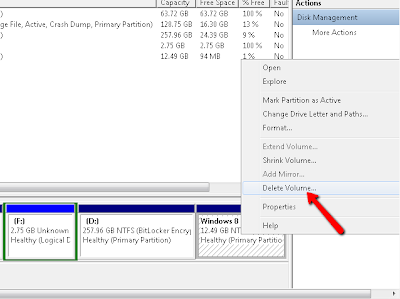
Right click on the Windows 8 partition and Select Delete Volume.
Note: If you overwrote Windows 7 with Windows 8 rather than dual-booting, then youll need to do a full system restore from a back up.
To erase your Windows 8 installation from the dual-boot configuration and just have Windows 7, perform these steps:
- Boot into Windows 7
- Launch Msconfig by hitting Windows + R to get the run box, typing msconfig and clicking Ok.

- Select the Boot tab.
- Select Windows 8 and click Delete.

- Click OK to exit msconfig.
- Launch Disk management by typing Create and format into the Start Menu and clicking on the Create and Format Hard Disk Partitions shortcut.


Right click on the Windows 8 partition and Select Delete Volume.


