Herbalist Dr MziziMkavu
Platinum Member
- Feb 3, 2009
- 43,114
- 34,956
Lets say your laptop does not start at all. You plug in the power adapter and press on the power button, but the computer will not react. Its dead and the power or battery charge LED will not light up.
What could be wrong? Is it bad power jack or the motherboard is dead?

By the way, the power jack (DC-IN jack) is the power socket on the side or back of your computer where you plug the AC/DC power adapter.
Ill explain how to perform basic troubleshooting and find out what is wrong. This is only for experienced people, who know how to disassemble laptops.
First of all, test the AC/DC power adapter with a multimeter. Its very likely that there is noting wrong with the laptop and your problem is related to the power adapter.
If the adapter tests fine and output correct voltage, disassemble the computer and remove the top cover.
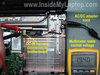
As you see on the first picture, in my example the power adapter plugs into the DC-IN power jack which is connected to the motherboard via a harness.
In some models the DC-IN power jack is soldered directly to the motherboard.
Plug in the power adapter and measure voltage at the point where the DC-IN jack or DC harness (like in my case) connected to the motherboard.
If you are reading the same voltage as on the AC adapter, it means the power jack or harness works properly and the problem is related to the motherboard.
If there is no voltage, most likely there is a problem with the jack or hardness and it has to be replaced.

By the way, in some case the problem could be related to the fuse which is usually located somewhere very close to the power jack/harness connector. You can test the fuse with a multimeter.

If the fuse is bad, the motherboard will appear to be dead even if there is nothing wrong with the power jack and AC/DC adapter. If thats the case, replacing the bad fuse should fix the problem.
What could be wrong? Is it bad power jack or the motherboard is dead?
By the way, the power jack (DC-IN jack) is the power socket on the side or back of your computer where you plug the AC/DC power adapter.
Ill explain how to perform basic troubleshooting and find out what is wrong. This is only for experienced people, who know how to disassemble laptops.
First of all, test the AC/DC power adapter with a multimeter. Its very likely that there is noting wrong with the laptop and your problem is related to the power adapter.
If the adapter tests fine and output correct voltage, disassemble the computer and remove the top cover.
As you see on the first picture, in my example the power adapter plugs into the DC-IN power jack which is connected to the motherboard via a harness.
In some models the DC-IN power jack is soldered directly to the motherboard.
Plug in the power adapter and measure voltage at the point where the DC-IN jack or DC harness (like in my case) connected to the motherboard.
If you are reading the same voltage as on the AC adapter, it means the power jack or harness works properly and the problem is related to the motherboard.
If there is no voltage, most likely there is a problem with the jack or hardness and it has to be replaced.
By the way, in some case the problem could be related to the fuse which is usually located somewhere very close to the power jack/harness connector. You can test the fuse with a multimeter.
If the fuse is bad, the motherboard will appear to be dead even if there is nothing wrong with the power jack and AC/DC adapter. If thats the case, replacing the bad fuse should fix the problem.