kuhamisha picha kutoka MacBook pro kwenda HTC one

kuhamisha picha kutoka MacBook pro kwenda HTC one

Malege

New Member
Joined
Jan 30, 2011
Posts
4
Reaction score
0
tafadhali nisaidie procedure ya kutumia picha zilizohifadhiwa ktk laptop MacBook Pro kwenda ktk Simu HTC One
 
htc sync manager is buggy for the MBP!!!
Jaribu ku soma hii >>>
How to Sync HTC to Mac OS X

1

February 17 aka Bs0d

Can't connect your HTC Sensation (or other HTC phones) to Mac? Well, connecting HTC devices to Windows computers is quite simple, but to connect HTC to Mac, things turn out to be a little tricky. This article will show you how to sync HTC to Mac (Lion included) step by step. In addition, it can be done without any third-party applications.
To hook up HTC Evo, HTC Sensation, HTC Flyer, HTC Vivid, HTC Desire etc. or other Android devices with your Mac, multiple steps are required:
Note: To connect HTC to Mac (Mountain Lion, Lion included), you only can mount your HTC as a disk drive and the article here would help you to manage files such as music, movies, photos, etc. between your HTC and Mac includingHTC to iTunes, HTC to iPad.1
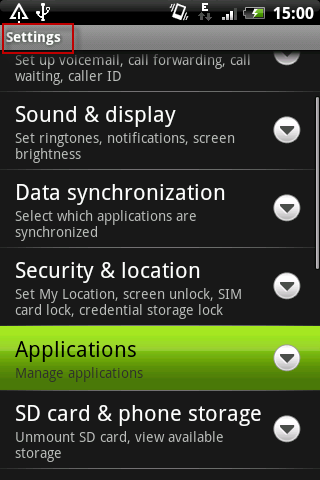
Go to "Setting" and choose "Applications"

applications.png


2
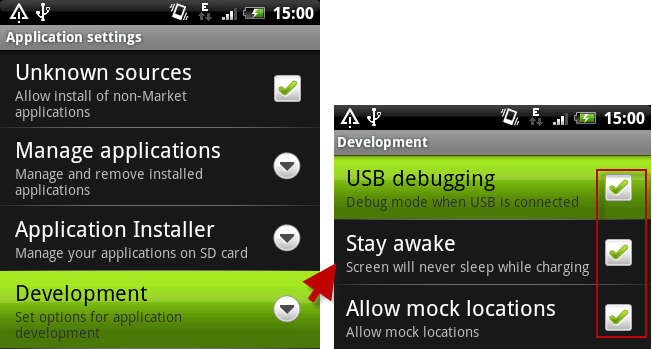
Click the "Development"

Here you need to tick the three items: USB debugging, Stay awake, Allow mock location, or you will be unable to copy your files on the SD card to Mac (Snow Leopard included).
development.png


3
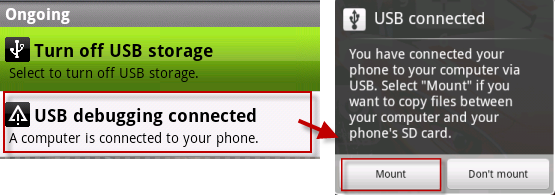
Click "USB connected", and select the "USB debugging connected:" and then click "Mount"

ongoing.png

Note: Some HTC phones like HTC Sensation here may present you a notice like this:
"Allow USB debugging?
USB debugging is intended for development purposes only. It can be used to copy data between your computer and your device, install applications on your device without notification, and read log data."
Click "OK".
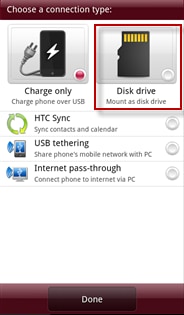
Then you connect your HTC to the Mac, the phone will be showed "USB connected" on the top. BTW, some types of HTC may work in other ways, for example, once you connected your HTC Sensation to Mac, you will be asked to choose your connection type between "Charge only" or "Disk Drive". Here Disk Drive is recommended.
setting-1.png


Now the HTC phone is successfully connected to Mac and you can freely manage your files on HTC Evo, HTC Sensation, HTC Flyer, HTC Vivid, HTC Desire etc. on Mac (also on MacBook, MacBook Pro, MacBook Air, iMac).
Besides, you can go to HTC to iTunes, HTC to iPad for more information about playing the files on Mac.
Note: Once you connected your HTC to Mac, please make sure the "USB Storage" is on. If not, slide down the notification panel and turn on it.
 
Back
Top Bottom